QOMO QClick QRF300 vs Poll Everywhere vs Meridia EZ-VOTE

A classroom that needs instant feedback has three honest options in 2026: buy a set of clickers and own them, rent a polling app every year and hope every student has a charged phone on the network, or call a voting-systems company and wait for a quote. Those are three different budget lines, three different failure modes, and three different answers to the same question. Here is how the entry-level QOMO QClick QRF300 stacks up against the strongest example of each alternative.

For a classroom on a budget, is the QOMO QClick QRF300, Poll Everywhere, or Meridia EZ-VOTE the better response system?

The one-line answer: buy the QOMO QClick QRF300 (from $687.88 for the 12-remote QRF312 kit up to $1,588.88 for the 32-remote QRF332) when students should not need phones, Wi-Fi, or accounts to answer a question. It is a one-time purchase, roughly $50 to $57 per seat depending on kit size, and the school keeps the hardware. Choose Poll Everywhere when every participant already carries a device on reliable Wi-Fi and you would rather pay per presenter each year, with K-12 premium listed near $50 per year and the Present plan at $120 per year. Choose Meridia EZ-VOTE when the room is a town meeting, board vote, or CME session rather than a classroom, and you need weighted or anonymous voting with a longer 200 to 450 foot range. For most K-12 classrooms the QRF300 is the pick, because it is the only one of the three that keeps working when the network does not.

3 Tools Compared

Tool / Business / Provider Score Speed / Distance Pricing / Details Rating
Top Choice
95%
No Wi-Fi needed From $687.88 (12-seat kit) ★★★★★
88%
Instant setup From about $50/yr (K-12), $120/yr Present plan ★★★★☆
86%
Quote required Quote only (no published price) ★★★★☆

QOMO QClick QRF300

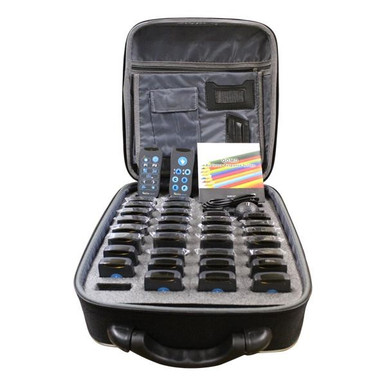
The QOMO QClick QRF300 is the entry point in QOMO's response line and the most classroom-shaped product in this comparison. It is sold as a class pack: RF student remotes, a teacher remote, and a receiver, all bought once and owned by the building. Nothing in the workflow depends on a student device, a login, or the wireless network, which is exactly why it survives the two situations that break app-based polling, a saturated Wi-Fi access point and a phone-free classroom policy.

  • Three class packs: QRF312 (12 student remotes), QRF324 (24), and QRF332 (32), each with a teacher remote and receiver, priced $687.88 to $1,588.88 at Encore Data Products against MSRPs of $994.00 to $2,281.00, a saving of up to $306.12.
  • Works out to roughly $57 per seat on the 12-pack and about $50 per seat on the 32-pack, paid once rather than annually.
  • Supports individual and group participation formats, so it handles team competition as well as solo quizzing.
  • Imports and exports XML files and converts collected information into PowerPoint slides for reporting and review.
  • Anonymous responding lets a teacher get honest feedback without putting any student on the spot, which is the whole point of a clicker over raised hands.

If you want the same approach with more headroom, the QRF500 steps up to 400 devices and a 250-foot range. For a single classroom on a fixed budget, the QRF300 does the job for less money and nothing recurring.

Read More : https://www.encoredataproducts.com/audience-response-systems/qomo-qclick-qrf300-audience-response-system/
Pros
  • One-time purchase with no annual subscription, no per-presenter seat, and no student accounts to manage. High
  • Works with no Wi-Fi and no student phones, so it functions in phone-free classrooms and buildings with weak wireless coverage. High
  • About $50 per seat on the 32-remote QRF332 kit, the lowest owned-hardware cost per seat of the three options here. High
  • Exports to XML and converts results into PowerPoint slides, so data leaves the system in formats teachers already use. High
  • Published pricing from Encore Data Products with school and district POs and TIPS 230901 and Choice Partners cooperative contracts. High
Cons
  • The building owns and stores 12 to 32 physical remotes, which means charging, inventory, and replacing the ones that walk off. Medium
  • Response types are simpler than a full QWERTY clicker or a phone keyboard, so long free-text answers are not its strength. Medium
  • Lower ceiling than the QRF500 if you later need to poll an assembly-sized group. Medium
  • Setup is a Windows and PowerPoint centered workflow rather than a browser dashboard. Low

Poll Everywhere (BYOD polling)

Poll Everywhere is the strongest example of the model that has taken most of this market: browser-based polling answered on whatever phone, tablet, or laptop the participant already carries. There is no hardware to purchase, store, or replace, and the pricing is per presenter rather than per participant, so one teacher running polls for 400 students still pays for a single seat. For a lecturer with a reliable network and an adult audience, that is hard to argue with.

  • Per-presenter pricing rather than per-participant, so audience size does not change the bill.
  • Published plan tiers reported at roughly $50 per year for K-12 premium and $120 per year for the Present plan, with Engage around $42 per month billed annually and Teams around $84 per month.
  • Event tiers exist for one-off conferences, listed at $499, $999, and $4,999, which is a different budget conversation entirely.
  • Runs in a browser with no receiver, no batteries, and no distribution and collection routine at the start and end of class.
  • Additional presenter seats are typically half price on most paid plans, except the Present plan where each extra user is full price.

The weaknesses are structural, not cosmetic: it needs a device in every hand and a network that can carry them, it costs money every single year with nothing owned at the end, and in a district with a phone-free policy or a 1:1 fleet that stays locked down, it simply cannot run the lesson.

Read More : https://www.polleverywhere.com/plans
Pros
  • No hardware to buy, charge, store, or replace, and nothing to hand out and collect each period. High
  • Per-presenter pricing means a large audience costs no more than a small one. High
  • Browser-based setup is fast and works from any presenter machine without a receiver. High
Cons
  • Every participant needs a personal device and a working network connection, which rules it out in phone-free classrooms and weak-Wi-Fi buildings. High
  • It is a recurring cost with no asset at the end; five years of fees buy nothing you keep. High
  • Published price points move between plans and tiers and are best confirmed with the vendor before budgeting. Medium
  • Personal devices in students' hands during a quiz introduce a supervision problem clickers do not have. Medium

Meridia EZ-VOTE 10

Meridia Interactive Solutions is one of the longest-running audience response vendors in the United States, and its EZ-VOTE keypads serve a market QOMO's classroom line does not chase: town meetings, association votes, continuing medical education, and government sessions. The EZ-VOTE 10 is the middle keypad in a four-model family, sized for trainers, educators, speakers, and electors, and it pairs with the EZ-VOTE Connect software suite and a PowerPoint voting plugin.

  • Ten buttons with a large LCD display, 3.6 by 2.1 by 0.3 inches, powered by two CR2032 coin cells with a stated six to twelve month life.
  • Rated for 200 feet of range covering a 400 by 400 foot area, with a three-year warranty; the larger EZ-VOTE HD and PRO models extend to 450 feet.
  • Sits in a line that spans EZ-VOTE 5 for basic yes-no voting up to EZ-VOTE PRO with a six-line LCD and SMS text messaging.
  • EZ-VOTE Connect adds session management and PowerPoint integration aimed at formal voting procedure rather than classroom quizzing.
  • Sold direct with quote-based pricing, which is standard for this segment but slower than buying a listed kit.

If your requirement is a recorded, procedurally correct vote in a hall full of adults, Meridia is a serious answer and QOMO is not really competing for that job. If your requirement is a teacher checking comprehension in third period, the quote cycle and the voting-first feature set are overhead you do not need.

Read More : https://www.meridiaars.com/electronic-voting-devices/
Pros
  • Purpose-built for formal voting: board meetings, town meetings, association elections, and CME sessions. High
  • Four keypad tiers from a basic five-button fob to a six-line LCD pad with SMS, so the hardware can match the room. High
  • Long-standing U.S. vendor with a three-year warranty on the EZ-VOTE 10 and six years on the HD model. High
Cons
  • No published pricing anywhere in the line, so every purchase starts with a quote request and a sales cycle. High
  • Feature set is oriented to voting procedure rather than classroom quizzing, gamified modes, or student reporting. Medium
  • Coin-cell power with a six to twelve month life on the EZ-VOTE 10 means routine battery replacement across a class set. Medium
  • Not carried by Encore Data Products, so it cannot be bought on the same PO or cooperative contract as the rest of a classroom AV order. High
Poll Everywhere (BYOD polling)

Poll Everywhere (BYOD polling)

No hardware to buy, but every student needs a device and a signal

Per presenter
Pricing Model
Required
Wi-Fi + Devices
Annual
Renewal

Poll Everywhere (BYOD polling)

No hardware to buy, but every student needs a device and a signal

Meridia EZ-VOTE lands third here only because this article is written from a classroom budget. Judged on its own turf, a municipal vote or a CME session where responses have to be recorded correctly and anonymously, it beats both other systems easily, and the 450-foot HD and PRO models reach rooms neither QOMO kit is rated for. What sinks it for a school is the buying experience and the fit: quote-only pricing with no published number, a feature set built around motions and ballots rather than quizzes, and no path to put it on the same purchase order as the headphones, document cameras, and panels a district is already ordering. If you are a town clerk, call Meridia. If you are a curriculum director, buy the QRF300.

QOMO QClick QRF300

QOMO QClick QRF300: The cost-effective class set: no phones, no accounts, no renewals

$0
Annual Fees
12/24/32
Kit Sizes
None
Student Devices Needed
Shop the QOMO QClick QRF300

How to Choose: Owned Clickers, BYOD Polling, or Voting Keypads

Start with one question: can you guarantee a charged, connected device in every hand, every time? If the answer is no, and in most K-12 classrooms it is no, buy the QOMO QClick QRF300. The QRF312 12-remote kit is $687.88, the QRF324 is the 24-remote step, and the QRF332 32-remote kit is $1,588.88, each including a teacher remote and receiver, with no annual fee behind it. That is roughly $50 to $57 per seat, once, for a system that works with the Wi-Fi down and the phones in the pouch.

If your audience is adults on reliable Wi-Fi and you would rather expense a subscription than a capital purchase, Poll Everywhere is the cleanest version of that model. If you are running formal votes rather than lessons, get a quote from Meridia. For everything in between, Encore Data Products stocks the QOMO QClick line with published pricing, accepts school and district purchase orders, and sells through TIPS 230901 and Choice Partners. Call 866-926-1669 to size a kit or compare the QRF300 against the larger QRF500.

Frequently Asked Questions

The QRF300 sells at Encore Data Products from $687.88 for the QRF312 12-remote class pack up to $1,588.88 for the QRF332 32-remote pack, against MSRPs of $994.00 to $2,281.00, a saving of up to $306.12. Every pack includes the student remotes, a teacher remote, and the RF receiver, and there are no annual fees.
No. The QRF300 uses its own RF remotes and receiver, so it works with no student devices, no network, and no accounts. That is the main practical advantage over app-based polling tools such as Poll Everywhere, which require every participant to have a connected device.
For an owned classroom set, usually yes. A QRF332 kit is $1,588.88 once, roughly $50 per seat, and the hardware keeps working after year one. Subscription polling is billed per presenter every year, reported at around $50 per year for K-12 premium and $120 per year for the Present plan, so the comparison depends on how many presenters you license and how long the clickers stay in service.
The QRF300 is the cost-effective classroom tier, sold in 12, 24, and 32-remote class packs from $687.88. The QRF500 is the larger system: up to 400 devices, a 250-foot RF range, six activity modes including Rush Quiz and Elimination, and short-answer support, priced from $764.88 to $1,673.88. Pick the QRF300 for a room, the QRF500 for a building.
No. Encore carries the QOMO QClick line for audience response; Meridia sells its EZ-VOTE keypads direct on a quote basis. If you need formal voting features such as motion-based balloting or a 450-foot range, Meridia is the right call. For classroom quizzing and instant feedback on a published price with a district PO, the QOMO QRF300 or QRF500 is the practical choice.

Useful Resources