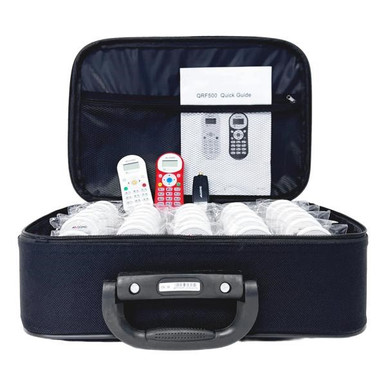
QOMO QClick QRF300 vs QRF500

Two kits, same family, about $77 apart at the entry size. Buyers stall on this decision constantly, usually because the spec sheets look similar until you get to the numbers that matter: how many devices the receiver will hold and how far the signal reaches. That is the whole comparison. One is sized for a classroom, the other for a building, and the price gap is smaller than most people expect.

Should I buy the QOMO QClick QRF300 or the QRF500?

The one-line answer: buy the QRF500 (from $764.88 for 12 remotes, $1,059.88 for 24, $1,673.88 for 32) if the system will ever serve more than one classroom, because it scales to 400 devices at a 250-foot range, adds six activity modes including Rush Quiz and Elimination, supports short-answer responses, and runs without a computer. Buy the QRF300 (from $687.88 for 12 remotes up to $1,588.88 for 32) if the scope is fixed at one room and price is the deciding factor, since it delivers the same no-Wi-Fi, no-phone, no-license model for roughly $77 less at the entry kit and lands near $50 per seat on the 32-pack. The gap between them is capacity and modes, not reliability.

2 Tools Compared

Tool / Business / Provider Score Speed / Distance Pricing / Details Rating
Top Choice
96%
PC-free operation $764.88 - $1,673.88 ★★★★★
92%
No Wi-Fi needed $687.88 - $1,588.88 ★★★★★

QOMO QClick QRF500

The QRF500 is the upper tier of the QClick line, and the extra money buys ceiling rather than polish. Its receiver handles up to 400 wireless devices at a maximum 250-foot range, which turns the same purchase into an assembly system, a professional-development system, and a board-meeting system instead of just a classroom one. For a district that will move the kit between buildings, that headroom is the entire justification.

  • Kits QRF512 (12 student remotes), QRF524 (24), and QRF532 (32), each with teacher remote and receiver, at $764.88, $1,059.88, and $1,673.88 against MSRPs of $1,119.00 to $2,406.00.
  • Up to 400 devices on one receiver, maximum range 250 feet.
  • Six activity modes: Normal Quiz, Rush Quiz, Elimination, Vote, Survey, and Freestyle.
  • Question types include true/false, multiple choice, and short answer, with the teacher remote acting as a presenter mouse.
  • Runs quizzes and surveys with no computer attached; QClick software adds PowerPoint-based authoring.

At 32 seats the QRF500 is about $52 per seat against roughly $50 for the QRF300, a difference of two dollars a seat for four times the device ceiling and the longer range. That is why it wins this head-to-head for most buyers.

Read More : https://www.encoredataproducts.com/audience-response-systems/qomo-qclick-qrf500-audience-response-system/
Pros
  • Scales to 400 devices at 250 feet, so one kit covers assemblies, PD days, and multiple classrooms. High
  • Six activity modes including Rush Quiz and Elimination for review games, not just assessment. High
  • Short-answer support in addition to true/false and multiple choice. High
  • Only about two dollars more per seat than the QRF300 at the 32-remote kit size. High
  • Teacher remote doubles as a presenter mouse, and the system runs without a computer. High
Cons
  • Costs about $77 more than the QRF300 at the 12-remote entry kit, which matters on a single-room budget. Medium
  • Capacity is wasted spend if the system will only ever poll one class of 25. Medium
  • More modes means slightly more teacher training before the extras get used. Low

QOMO QClick QRF300

The QRF300 is the cost-effective member of the QClick family, built for a single classroom, a group meeting, or any room where instant feedback beats raised hands. It uses the same fundamental design, RF remotes talking to their own receiver with no student device or network in the loop, and it gives up capacity rather than dependability to hit its price.

  • Class packs QRF312 (12), QRF324 (24), and QRF332 (32), each with teacher remote and receiver, at $687.88 to $1,588.88 against MSRPs of $994.00 to $2,281.00.
  • Saves up to $306.12 off MSRP at Encore Data Products.
  • Individual and group participation formats for solo quizzing and team review.
  • XML import and export, plus conversion of collected results into PowerPoint slides.
  • Anonymous responses encourage honest answers from students who would not raise a hand.

It loses this comparison only on ceiling. For a teacher who needs one reliable class set and will never poll an auditorium, the QRF300 is the correct purchase and the cheapest owned seat QOMO sells.

Read More : https://www.encoredataproducts.com/audience-response-systems/qomo-qclick-qrf300-audience-response-system/
Pros
  • Lowest entry price in the QClick line at $687.88 for a complete 12-seat kit. High
  • About $50 per seat at the 32-remote QRF332 pack, the cheapest owned seat of the two. High
  • Same independence from Wi-Fi, student phones, and accounts as the QRF500. High
  • XML export and PowerPoint conversion for reporting and review. High
Cons
  • Documented capacity and range are scoped to a classroom, not an assembly. Medium
  • Does not advertise the QRF500's six named activity modes or short-answer question type. Medium
  • Savings shrink to about two dollars per seat at the 32-remote size, so the cheaper kit is only clearly cheaper at small quantities. High
QOMO QClick QRF300

QOMO QClick QRF300

The lower entry price and the cheapest seat in the family

$687.88
Entry Kit
~$50
Per Seat (32-pack)
12/24/32
Class Packs

QOMO QClick QRF300

The lower entry price and the cheapest seat in the family

There is no loser in this comparison, only a scope decision. The QRF300 is not a weaker build of the QRF500; it is the same approach with a lower ceiling and a lower price. It loses the head-to-head because the price gap narrows to roughly two dollars per seat at 32 remotes, and at that point the QRF500's 400-device capacity and 250-foot range are nearly free. Buy the QRF300 when the kit will live in one room for its whole life and the entry price is what has to clear. Buy the QRF500 when anyone might ask to borrow it for an assembly.

QOMO QClick QRF500

QOMO QClick QRF500: More devices, longer reach, six modes, short-answer support

400
Max Devices
250 ft
RF Range
6
Activity Modes
Shop the QOMO QClick QRF500

One Question Decides This

Will this kit ever need to serve more than one classroom? If yes, buy the QOMO QClick QRF500: $764.88 for 12 remotes, $1,059.88 for 24, and $1,673.88 for 32, with up to 400 devices, a 250-foot range, six activity modes, and short-answer support. If no, buy the QOMO QClick QRF300 at $687.88 to $1,588.88 and keep the difference.

Both kits include student remotes, a teacher remote, and the RF receiver, and neither carries a subscription, license, or student account. Encore Data Products lists both with published pricing, accepts school and district purchase orders, and sells through TIPS 230901 and Choice Partners cooperative contracts. Call 866-926-1669 for help sizing a kit across multiple rooms.

Frequently Asked Questions

Capacity and features. The QRF500 supports up to 400 devices at a maximum 250-foot range, offers six activity modes, and supports short-answer questions. The QRF300 is the cost-effective classroom tier sold in 12, 24, and 32-remote class packs. Both use RF remotes with their own receiver and require no student devices or network.
The QRF300 runs $687.88 to $1,588.88 for its QRF312, QRF324, and QRF332 packs, against MSRPs of $994.00 to $2,281.00. The QRF500 runs $764.88 to $1,673.88 for QRF512, QRF524, and QRF532, against MSRPs of $1,119.00 to $2,406.00. All prices are at Encore Data Products.
The QRF300 at roughly $50 per seat on the 32-remote pack, versus about $52 per seat for the equivalent QRF500 kit. The gap is widest at the 12-remote size, where the QRF300 is about $77 less for the whole kit.
No. Both use their own RF remotes and receiver, so they work with no student devices, no network, and no accounts. The QRF500 additionally runs polls without a computer attached.
Each pack includes the student remotes in the named quantity (12, 24, or 32), one teacher remote, and one RF receiver. QClick software with a PowerPoint plugin is included for authoring quizzes and assignments.

Useful Resources